
Skills
A skill is a reusable, named block of instructions that you write once and attach to any Agent block, in any workflow, in your workspace. Each skill has three parts: a name, a one-sentence description that tells an agent when to reach for it, and content — the actual instructions, written in markdown — that the agent follows once it decides the skill is relevant.
Skills exist to solve a specific problem: the more instructions you cram into an agent's system prompt, the more it costs to run and the harder it is for the model to stay focused, but a real agent often needs dozens of narrow, situational procedures ("how we word a refund apology," "how to triage a support ticket," "the exact steps for parsing this vendor's invoice format") that most conversations will never touch. Skills solve this with progressive disclosure: every skill attached to an Agent block contributes only its name and description to the system prompt, all the time, regardless of how long its instructions are. The full markdown content is fetched on demand — only when the agent itself decides, mid-run, that a particular skill applies — via a load_skill tool call. A workflow can have fifty skills attached to it and the always-on cost in the system prompt is fifty short lines; a 20,000-token skill costs a single line until the moment it's actually needed.
Creating a Skill
Skills are created from the Skills page in your workspace sidebar, and every skill lives at the workspace level — not inside a single workflow — so it can be reused across every workflow in that workspace.
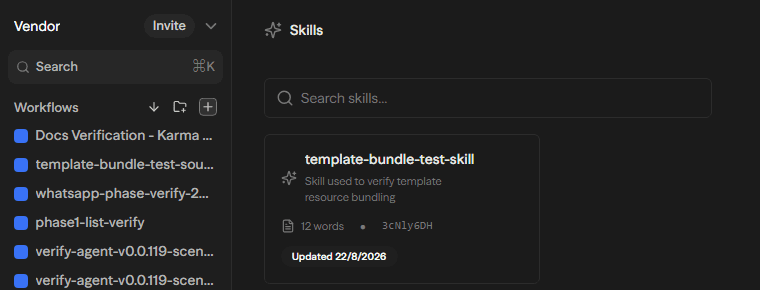
Creating one manually asks for the same three fields the platform stores:
- Name — a short, title-case label for the skill (for example, "Refund Email Formatting").
- Description — one sentence describing when an agent should use it. This is the only part of the skill an agent sees before deciding to load it, so it should describe the trigger, not summarize the contents (for example, "Use when drafting a customer-facing refund or cancellation email").
- Content — the instructions themselves, written in markdown, in the second person, as directions for the agent to follow: the steps to take, the decisions to make, how to handle edge cases, and the shape of the expected output.
Generating a Skill with AI
Writing the instructions from scratch is the part people get stuck on, so the create dialog also offers Generate with AI: describe the job you want handled in a sentence or two ("Read an inbound invoice, pull out the number, date and totals, and flag anything that looks off"), and a model drafts the name, description, and content for you. Generation is a draft only — nothing is saved to the workspace until you review the result and click Create, so you always see the instructions an agent would follow before they take effect. This flow reuses the same generation route as the Databases block's field-suggestion feature, so it automatically follows whichever model provider your deployment is already configured to use.
Skill names must be unique within a workspace — trying to save a second skill with a name already in use in that workspace returns an error rather than silently overwriting anything.
Attaching Skills to an Agent
Every workspace has one shared skill library, visible from the Skills page and from every Agent block in every workflow in that workspace. To use one, open an Agent block's configuration panel and find its Skills field: a searchable, multi-select picker listing every skill in the workspace. Selecting one or more adds them as chips on the block; each chip shows the skill's name and, on hover, its description.
An Agent block stores only the id of each attached skill (plus a cached display name for the chip). This matters in one visible way: if a skill is later deleted while it's still attached to a block, the chip is flagged in red as no longer existing, since the platform doesn't silently pretend a deleted skill is still there — but nothing else in the workflow breaks, because the executor always re-resolves skills from the database at run time rather than trusting anything cached in the block's configuration. If the workspace has no skills yet, the picker shows an empty state with a direct link to create one.
How Skills Work at Runtime
When an Agent block with skills attached runs, Mandala does not hand the agent the full instructions of every attached skill up front. Instead:
- At the start of the run, only each attached skill's name and description are added to the agent's system prompt, in a short, structured list. The agent also gets a
load_skilltool it can call, with an argument that must be one of the attached skills' names. - During the run, the agent reads the list of available skills and their trigger descriptions like a table of contents. If none of them are relevant to what it's doing, it never calls
load_skill, and the full content of those skills is never fetched or added to the conversation. - The moment the agent decides a skill applies, it calls
load_skillwith that skill's name. Only then does Mandala fetch the skill's full markdown content from the database and hand it back as the tool's result — at which point the agent has the complete instructions and can follow them for the rest of the run.
In short: the agent always knows a skill exists and roughly when to use it, but only pays the token cost of reading a skill's full instructions the moment it actually needs them — which is what keeps the system prompt small no matter how many skills a workspace accumulates.
Every one of these lookups is scoped to the workflow's own workspace: a skill id or name that belongs to a different workspace simply resolves to nothing rather than leaking its content across a boundary, and a stale or deleted skill id is silently skipped rather than failing the run.
Permissions
Skills follow a deliberately simple, two-tier access model layered on top of ordinary workspace permissions:
- Seeing and using every skill requires only workspace access. Anyone who can open the workspace can see the full skill library, attach any skill to any Agent block, and let an agent load its content at run time — there is no per-skill "who can use this" restriction.
- Creating a new skill shows in the UI as gated on Write (or Admin) permission — the create button follows the same permission level as creating or editing a workflow. The API behind it, however, only checks that you have some access to the workspace, so a Read-only member who reaches the endpoint directly is not actually blocked from creating a skill; the Write requirement is enforced by the UI, not the server.
- Editing, deleting, or sharing an existing skill is gated per skill, separately from workspace-level permissions:
- The person who creates a skill is automatically granted edit rights to it, even if they only hold Write (not Admin) permission on the workspace.
- Workspace Admins are always editors of every skill in the workspace — this is derived automatically and can't be revoked.
- Additional editors can be granted explicitly, one skill at a time, from that skill's editor list.
- If someone loses access to the workspace, any explicit editor grants they held on its skills are removed. Workspace admins remain derived editors regardless, so a skill can never end up with no one able to maintain it.
In practice this means every workspace member can freely attach and run any skill, while only the people who authored a skill (or workspace admins) can change what it actually instructs an agent to do.
Copilot Can Create Skills For You
You don't have to author a skill by hand every time — Copilot can find-or-create a skill on its own while it's building or editing a workflow for you. If you ask it to make an Agent block follow some procedure, it can check whether a matching skill already exists in the workspace, create a new one if not, and attach it to the block, all without leaving the chat. This runs under your own workspace permissions, so the same access rules above still apply.
Example Use Cases
Skills are the natural place to put company-specific or repetitive know-how you don't want copy-pasted into every Agent block's system prompt:
- Refund and cancellation email formatting — a skill that captures your company's exact tone, required disclaimers, and formatting for customer-facing refund emails, attached to every support-related Agent block so the wording stays consistent without repeating it in every workflow.
- Support ticket triage — a skill describing how to categorize an inbound ticket, what counts as urgent, and what information to extract before routing it.
- Vendor invoice parsing — a skill with the exact fields to pull from a specific vendor's invoice layout and what to flag as suspicious, used only by the Agent blocks that actually handle that vendor.
- Brand voice and style guide — a general-purpose writing skill that any content-generating agent in the workspace can load when it's drafting customer-facing copy.
- Compliance boilerplate — required disclaimers or legal language that must appear in certain kinds of outbound communication, kept in one place so a wording change only has to happen once.
The common thread: each of these could live directly in an Agent block's system prompt, but doing that means pasting (and re-syncing) the same text across every workflow that needs it, and paying its full token cost on every single run — including the runs that never touch that scenario. As a skill, it's written once, reused across as many Agent blocks and workflows as need it, edited in one place, and only costs real context on the runs where the agent actually decides to load it.