
Cost Calculation
Mandala automatically calculates costs for all workflow executions, providing transparent pricing based on AI model usage and execution charges. Understanding these costs helps you optimize workflows and manage your budget effectively.
How Costs Are Calculated
Every workflow execution includes two cost components:
Base Execution Charge: $0.001 per execution
AI Model Usage: Variable cost based on token consumption
modelCost = (inputTokens × inputPrice + outputTokens × outputPrice) / 1,000,000
totalCost = baseExecutionCharge + modelCost
AI model prices are per million tokens. The calculation divides by 1,000,000 to get the actual cost. Workflows without AI blocks only incur the base execution charge.
Model Breakdown in Logs
For workflows using AI blocks, you can view detailed cost information in the logs:
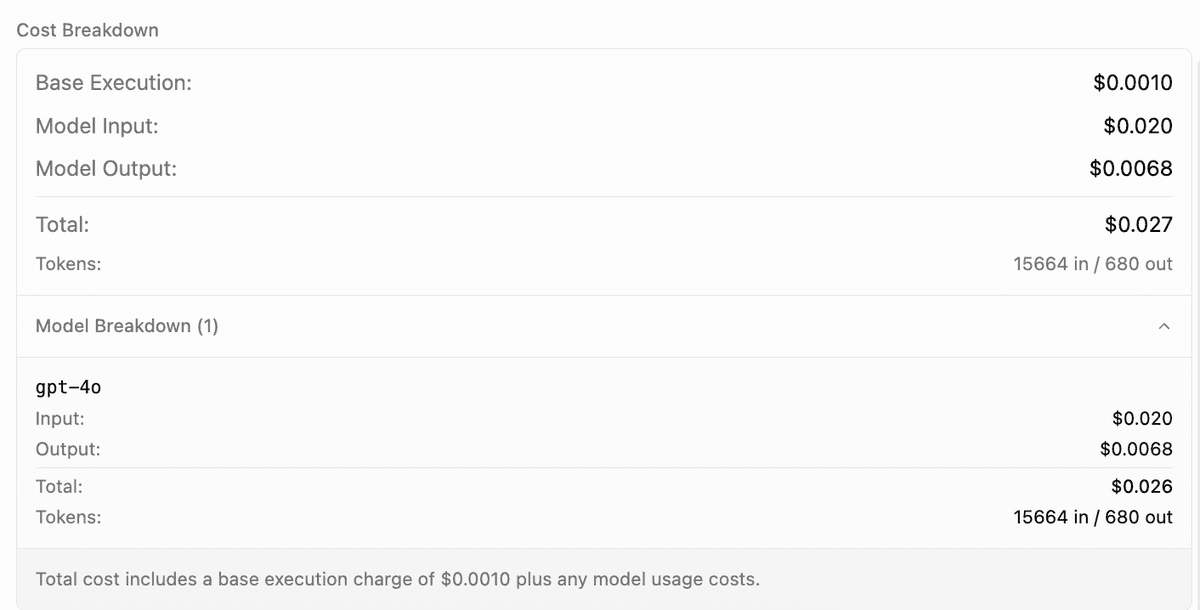
The model breakdown shows:
- Token Usage: Input and output token counts for each model
- Cost Breakdown: Individual costs per model and operation
- Model Distribution: Which models were used and how many times
- Total Cost: Aggregate cost for the entire workflow execution
Pricing Options
Hosted Models - Mandala provides API keys with a 2.5x pricing multiplier:
| Model | Base Price (Input/Output) | Hosted Price (Input/Output) |
|---|---|---|
| GPT-4o | $2.50 / $10.00 | $6.25 / $25.00 |
| GPT-4.1 | $2.00 / $8.00 | $5.00 / $20.00 |
| o1 | $15.00 / $60.00 | $37.50 / $150.00 |
| o3 | $2.00 / $8.00 | $5.00 / $20.00 |
| Claude 3.5 Sonnet | $3.00 / $15.00 | $7.50 / $37.50 |
| Claude Opus 4.0 | $15.00 / $75.00 | $37.50 / $187.50 |
The 2.5x multiplier covers infrastructure and API management costs.
Your Own API Keys - Use any model at base pricing:
| Provider | Models | Input / Output |
|---|---|---|
| Gemini 2.5 | $0.15 / $0.60 | |
| Deepseek | V3, R1 | $0.75 / $1.00 |
| xAI | Grok 4, Grok 3 | $5.00 / $25.00 |
| Groq | Llama 4 Scout | $0.40 / $0.60 |
| Cerebras | Llama 3.3 70B | $0.94 / $0.94 |
| Ollama | Local models | Free |
Pay providers directly with no markup
Pricing shown reflects rates as of September 10, 2025. Check provider documentation for current pricing.
Cost Optimization Strategies
Usage Monitoring
Monitor your usage and billing in Settings → Subscription:
- Current Usage: Real-time usage and costs for the current period
- Usage Limits: Plan limits with visual progress indicators
- Billing Details: Projected charges and minimum commitments
- Plan Management: Upgrade options and billing history
Programmatic Usage Tracking
You can query your current usage and limits programmatically using the API:
Endpoint:
GET /api/users/me/usage-limitsAuthentication:
- Include your API key in the
X-API-Keyheader
Example Request:
curl -X GET -H "X-API-Key: YOUR_API_KEY" -H "Content-Type: application/json" https://mandala.ayantram.com/api/users/me/usage-limitsExample Response:
{
  "success": true,
  "rateLimit": {
    "sync": { "isLimited": false, "requestsPerMinute": 25, "maxBurst": 25, "remaining": 25, "resetAt": "2025-09-08T22:51:55.999Z" },
    "async": { "isLimited": false, "requestsPerMinute": 200, "maxBurst": 200, "remaining": 200, "resetAt": "2025-09-08T22:51:56.155Z" },
    "authType": "api"
  },
  "usage": {
    "currentPeriodCost": 12.34,
    "limit": 20,
    "plan": "pro"
  },
  "storage": {
    "usedBytes": 104857600,
    "limitBytes": 1073741824,
    "percentUsed": 9.77
  }
}
Response Fields:
rateLimit.sync/rateLimit.asyncreportrequestsPerMinute(sustained rate) andmaxBurst(burst capacity) separately — there's no singlelimitfield herecurrentPeriodCostreflects usage in the current billing periodusage.limitis your included-usage dollar amount for the current plan (see Plan Limits above)planis the highest-priority active plan associated with your userstoragereports file/knowledge-base storage usage, separate from execution cost usage
Plan Limits
Different subscription plans have different usage limits:
| Plan | Included Usage | Rate Limits (per minute) |
|---|---|---|
| Free | $20 (no overage — hard cap) | 10 sync, 50 async |
| Pro | $20/seat included, then overage billed | 25 sync, 200 async |
| Team | $40/seat included (pooled), then overage billed | 75 sync, 500 async |
| Enterprise | $200/seat included by default, custom by agreement | 150 sync, 1000 async (defaults, customizable) |
These are the platform defaults. See Billing Model below for how included usage and overage actually interact — the numbers above are consistent with it, unlike an earlier version of this table.
Billing Model
Mandala uses a base subscription + overage billing model:
How It Works
Pro Plan ($20/month):
- Monthly subscription includes $20 of usage
- Usage under $20 → No additional charges
- Usage over $20 → Pay the overage at month end
- Example: $35 usage = $20 (subscription) + $15 (overage)
Team Plan ($40/seat/month):
- Pooled usage across all team members
- Overage calculated from total team usage
- Organization owner receives one bill
Enterprise Plans:
- Fixed monthly price, no overages
- Custom usage limits per agreement
Threshold Billing
When unbilled overage reaches $50, Mandala automatically bills the full unbilled amount.
Example:
- Day 10: $70 overage → Bill $70 immediately
- Day 15: Additional $35 usage ($105 total) → Already billed, no action
- Day 20: Another $50 usage ($155 total, $85 unbilled) → Bill $85 immediately
This spreads large overage charges throughout the month instead of one large bill at period end.
Cost Management Best Practices
- Monitor Regularly: Check your usage dashboard frequently to avoid surprises
- Set Budgets: Use plan limits as guardrails for your spending
- Optimize Workflows: Review high-cost executions and optimize prompts or model selection
- Use Appropriate Models: Match model complexity to task requirements
- Batch Similar Tasks: Combine multiple requests when possible to reduce overhead
Next Steps
- Review your current usage in Settings → Subscription
- Learn about Logging to track execution details
- Explore the External API for programmatic cost monitoring
- Check out workflow optimization techniques to reduce costs