
Copilot
Copilot is your in-editor assistant that helps you build and edit workflows with Mandala Copilot, as well as understand and improve them. It can:
- Explain: Answer questions about Mandala and your current workflow
- Guide: Suggest edits and best practices
- Edit: Make changes to blocks, connections, and settings when you approve
Copilot is a Mandala-managed service. For self-hosted deployments, generate a Copilot API key in the hosted app (mandala.ayantram.com→ Settings → Copilot)
- Go to mandala → Settings → Copilot and generate a Copilot API key
- Set
COPILOT_API_KEYin your self-hosted environment to that value
Context Menu (@)
Use the @ symbol to reference various resources and give Copilot more context about your workspace:
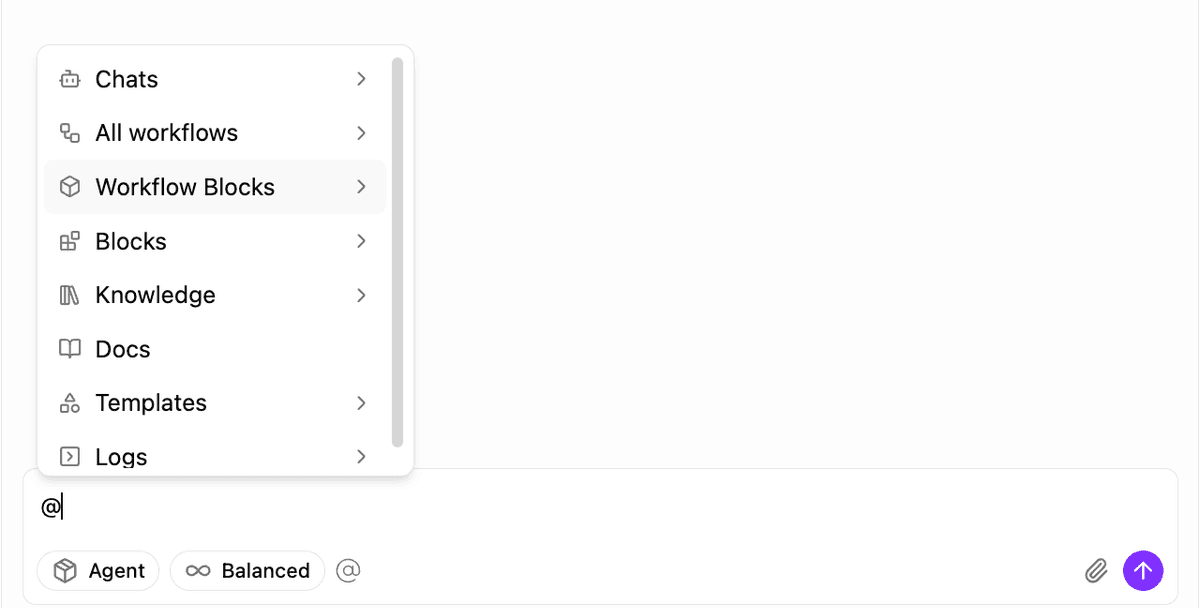
The @ menu provides access to:
- Chats: Reference previous copilot conversations
- All workflows: Reference any workflow in your workspace
- Workflow Blocks: Reference specific blocks from workflows
- Blocks: Reference block types and templates
- Knowledge: Reference your uploaded documents and knowledgebase
- Docs: Reference Mandala documentation
- Templates: Reference workflow templates
- Logs: Reference execution logs and results
This contextual information helps Copilot provide more accurate and relevant assistance for your specific use case.
Modes
Ask
Q&A mode for explanations, guidance, and suggestions without making changes to your workflow.
Plan
Works out an approach before touching the canvas -- useful for larger changes you want to review the shape of first.
Build
Build-and-edit mode. Copilot proposes specific edits (add blocks, wire variables, tweak settings) and applies them when you approve.
Build Sub-Modes
While in Build mode, a second selector narrows what Copilot focuses on:
Create
Edit
Debug
Reviewing Proposed Changes
When Agent mode proposes an edit — adding a block, wiring a connection, changing a setting — Copilot applies the proposed version to your workflow right away, but marks it as a pending diff rather than a finished change: new blocks and edited fields are visually highlighted on the canvas so you can see exactly what changed.
A floating control bar appears while the diff is active:
- Preview toggle: switch between the proposed version and your original workflow
- Reject: restore your workflow to exactly how it was before the proposal
- Accept: keep the change and clear the diff highlighting
Nothing is treated as settled until you explicitly Accept or Reject. Rejecting reverts the workflow to its pre-proposal state; Accepting just clears the highlighting, since the change is already saved. This gives you a chance to review every edit Copilot proposes before you commit to it.
Model Selection
Rather than abstract depth tiers, Copilot's model selector lists real underlying models directly (for example GPT 5.2, GPT 5.1, GPT 5.1 Codex, GPT 5.1 Medium, o3, o1) -- pick whichever fits your task's complexity and cost tolerance. A MAX badge appears next to specific high-end models when they're available, rather than being a separate toggle you enable on top of your chosen model.
Which exact models are listed changes as providers ship new ones -- the selector itself is the source of truth for what's available today.
Self-Serve Capabilities
In Build mode, Copilot can create the resources a workflow needs on its own, not just edit blocks that already exist -- for example creating a new database or table, creating a new skill and attaching it to an agent, adding an MCP server or custom tool, or searching the web for context. If your request implies a resource you haven't created yet, Copilot will generally offer to create it rather than asking you to go set it up first.
Billing and Cost Calculation
How Costs Are Calculated
Copilot usage is billed per token from the underlying LLM, at the provider's base rate for both input and output -- there's no markup multiplier on either side:
copilotCost = (inputTokens × inputPrice + outputTokens × outputPrice) / 1,000,000| Component | Rate Applied |
|---|---|
| Input | inputPrice |
| Output | outputPrice |
Pricing shown reflects rates as of September 4, 2025. Check provider documentation for current pricing.
Model prices are per million tokens. The calculation divides by 1,000,000 to get the actual cost. See the Cost Calculation page for background and examples.